

Farm labor management software can bring workforce records, task activity, and compensation information into one organized process. By connecting these records, farm managers can review labor across crews, crops, and work periods. The aim is practical visibility: see what work was assigned and completed, and how recorded hours relate to operating costs.
That clarity matters when schedules shift, seasonal crews change, or managers oversee work across multiple areas. Disconnected notes and repeated data entry make routine reviews harder. A system is useful when it fits how your farm assigns work, records activity, communicates changes, and prepares payroll, rather than creating a second process for employees to maintain.
This guide explains how to evaluate these capabilities without treating software as a substitute for sound management. Learn how labor records support cost analysis, which workflow features to assess, and how task updates clarify responsibilities. It also covers team communication and payroll preparation, helping you set practical priorities before choosing a digital approach.
Key Takeaways
- Separate labor records by crew, crop, field, or task to see where work hours and costs are concentrated.
- Choose tools around daily routines, mobile access, and the reports managers need to make decisions.
- Clear task assignments and consistent work records can strengthen communication and team accountability.
- Organized time and compensation records can reduce manual payroll preparation and make reviews easier.
- When workforce sourcing is also a challenge, AgriVerse-X is developing a platform intended to connect agricultural employers with workers.
Labor cost analysis and compensation tracking
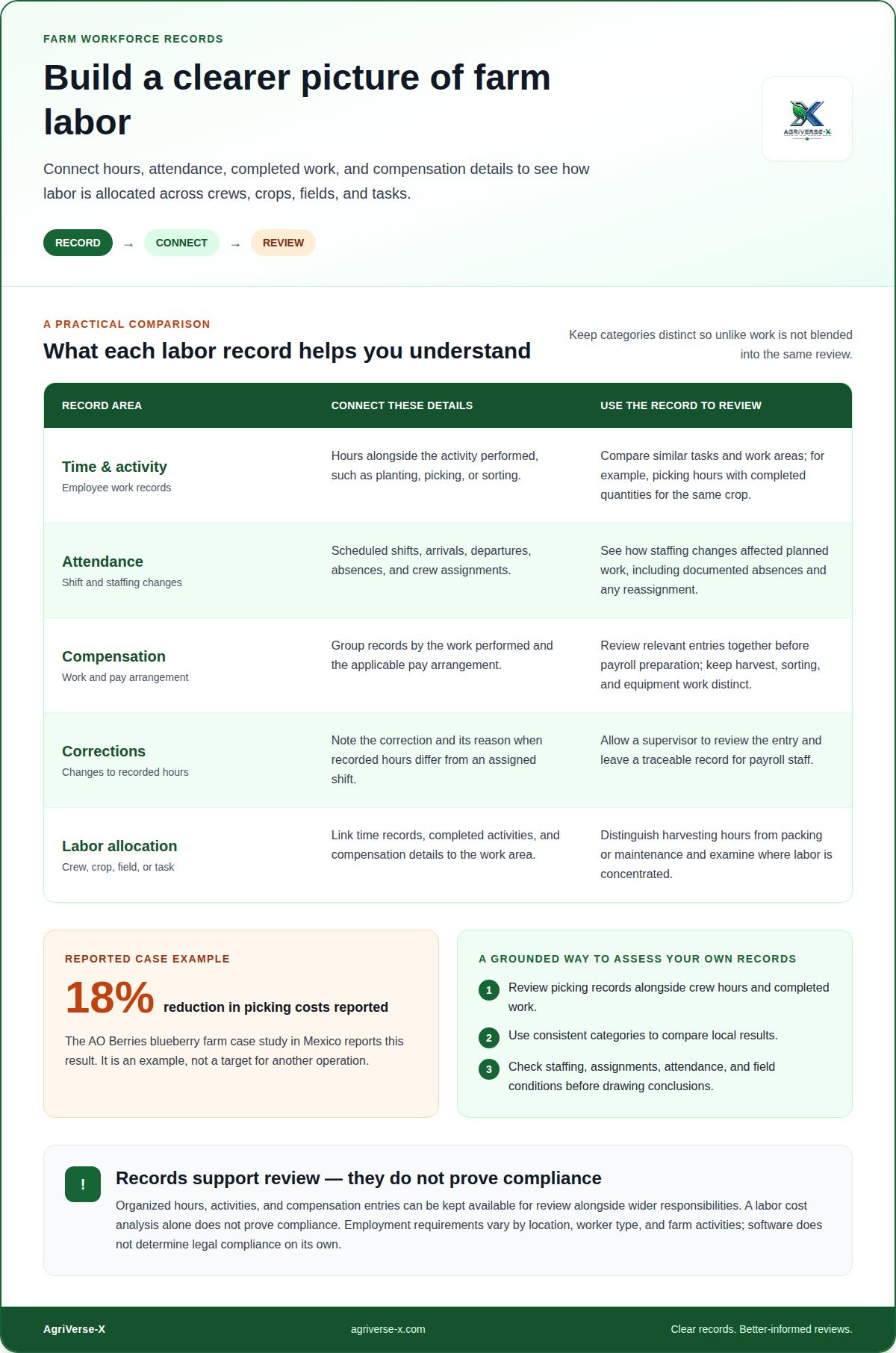
Connect time records, completed activities, and compensation details to understand labor use. Organize entries by crew, crop, field, or task. Managers can then distinguish harvesting hours from packing or maintenance work and review how labor is allocated across operations.
Employee Time and Productivity Tracking
Record each employee’s hours alongside the activity performed, such as planting, picking, or sorting. Compare similar tasks and work areas instead of combining unrelated activities. For example, a manager could review picking hours and completed quantities for the same crop. This provides context for productivity analysis without assuming every field or workday has identical conditions.
Worker Attendance Tracking
Use a consistent record for scheduled shifts, arrivals, departures, and absences. Link attendance to crew assignments so managers can see how staffing changes affected planned work. If a picker misses a shift, a supervisor can document the absence and record any reassignment. These details help distinguish attendance changes from differences in recorded output.
For compensation analysis, group records by the work performed and the applicable pay arrangement. Keep task categories distinct so harvesting time does not blend with sorting or equipment work. Managers can review the relevant records together before payroll preparation. Clear categories also help explain how assignment changes affect overall labor allocation.
A reported case offers a specific reference point: the AO Berries blueberry farm case study in Mexico reports an 18% reduction in picking costs. Treat that figure as an example, not a target for another operation. Its practical lesson is to examine picking records alongside crew hours and completed work, then assess local results using consistent categories.
Work records can also clarify compensation questions. If an employee’s recorded hours differ from an assigned shift, note the correction and its reason. A supervisor can review the entry before approval, leaving a traceable record for payroll staff. Documented work details help resolve discrepancies without relying on memory or scattered notes.
Review patterns across comparable tasks and work periods. If recorded labor use changes, examine staffing, task assignments, attendance, and field conditions before drawing conclusions. Useful analysis links each cost entry to the activity it represents. This makes it easier to identify gaps in recordkeeping and labor decisions that need closer review.
Consistent, reviewed labor records can support wider operational documentation. GLOBALG.A.P. standards address food safety, environmental responsibility, worker welfare, animal welfare, and supply chain transparency in primary production and the supply chain. Clear entries for hours, activities, and compensation can help managers keep labor information distinct and available for review alongside these responsibilities. A cost analysis alone, however, does not prove compliance.
The median company size in the listed dataset is 1-10 employees. For a business of any size, a practical approach is to use record categories that match its actual work and retain enough context to explain changes in hours or assignments. Reviewing those entries regularly can help managers spot gaps, correct unclear classifications, and discuss compensation questions with supporting details. Consistent records make later comparisons more useful while keeping conclusions grounded in the work documented.
Choosing software to fit farm workflows
Choose a system that fits the work your teams already do. Map daily operations first, then match each workflow to useful software features.
Start with a typical workday, such as a crew moving from greenhouse planting to field packing. Identify who assigns each activity, where workers record progress, and how managers review changes. Then assess whether supervisors working across fields or livestock areas need mobile access. Software should support the workflow, not force every operation into one rigid template.
Customizable Workforce Management
Customization should let managers organize roles, tasks, locations, and reports around actual farm operations. A mixed farm, for example, could create separate workflows for vegetable planting, equipment maintenance, and livestock feeding. Look for editable task categories and clear role permissions. These features help teams record relevant activities and keep workforce reports understandable across departments.
Test the workflow during a real shift before adopting it more broadly. For a harvest crew, follow task assignment, worker updates, supervisor review, and end-of-shift reporting. For a livestock team, trace feeding or housing checks through the same steps. Note where staff must make duplicate entries or complete extra approvals. These friction points reveal whether the system fits daily work or adds administration.
Labor Laws and Recordkeeping
For farm employee management in the U.S., applicable federal, state, and local employment rules depend on location, worker type, and farm activities. Software can organize time and employment records, but it cannot determine legal compliance on its own. Configure record fields and retention practices with a qualified employment professional familiar with your operation’s requirements.
Assess record access as carefully as task features. A supervisor may need to correct a missed clock entry, while payroll staff need a reviewable history of changes. Define who can submit, approve, and amend records. Keep corrections auditable by documenting the reason and approval when a recorded shift differs from the schedule.
Consider connectivity across the worksite, too. If field teams have unreliable internet access, test how the system handles task entry and later synchronization before relying on it. Check whether workers can follow instructions on a mobile screen and managers can review activity from the office. A practical trial should include the devices and work locations used in normal operations.
Compare each feature with a specific workflow need. If your priority is coordinating seasonal crews, assess assignments, role changes, and reporting. If managers oversee crops and livestock, check that distinct task categories remain clear in shared reports. Choose a system that supports these operations without unnecessary steps, then introduce it through a defined workflow and review staff feedback.
Task management and daily workflows
Daily task management turns a crop plan into clear work sequences. Farm labor management software can connect work orders with field locations and crop activities. For example, a manager can schedule bed preparation before transplanting, then revise the sequence when rain delays outdoor work.
Build each task around its purpose, location, and completion criteria. A tomato grower might create separate work orders for seedling preparation, greenhouse transplanting, and irrigation checks. Each order can identify the relevant block and supplies needed. Specific details help workers understand an assignment before starting, without combining separate jobs into one broad instruction.
Schedule work according to dependencies. Workers cannot transplant seedlings into unprepared beds, so the plan should schedule bed preparation first. A manager can also reserve time for greenhouse maintenance when field access is disrupted. This keeps useful work visible while allowing supervisors to adjust priorities as conditions change.
Recurring operations benefit from reusable task templates. A daily irrigation inspection, for example, can specify the growing area, inspection activity, and space for observations. A harvest workflow can divide work into picking, sorting, and packing. Growers can adapt templates by crop or location while keeping the steps familiar to workers moving between teams.
- Define: Name the activity, location, and completion criteria.
- Sequence: Place prerequisite work before dependent tasks.
- Assign: Match each work order to the responsible crew or role.
- Adjust: Update the plan when weather or equipment changes access.
Farm labor management software should make schedule changes visible to the people affected. If a pump issue delays irrigation, a supervisor can reschedule the activity and assign another available task. A clear update helps crews avoid following an outdated plan and gives managers a current view of open work orders.
Task analytics can reveal bottlenecks across comparable activities. If greenhouse bed preparation repeatedly delays transplanting, managers can examine the sequence, supply availability, and instructions. Compare similar crops and work areas rather than treating different jobs as equivalent. Use those observations to revise templates or adjust task timing.
Start with a familiar workflow, such as seedling preparation through transplanting. Configure its work orders, assign the sequence, and review completed activities with the team. Clarify confusing task names before applying the approach to irrigation or harvest work. This practical rollout can improve scheduling while keeping the digital plan grounded in daily farm operations.
Trace each process from seedling preparation through completion, then review whether the sequence captures the work your team needs to coordinate using AgriVerse-X. Farmers choosing farm management software should assess what they manage daily and whether they need mobile access. Consider which tasks must be created, assigned, updated, or checked during a normal workday, and whether those actions need to be available away from a desk. Keep the evaluation tied to actual workflows: a tool should support the activities and locations represented in the plan, while making changes understandable to the people carrying them out. Revisit the setup as priorities shift, and refine task details where crews need clearer direction.
Team communication and accountability
Clear communication links an assignment to the person completing it. During a tomato harvest, a supervisor can share the target rows, picking instructions, and delivery point before work begins. Workers can report a blocked row or equipment issue through the same workflow. Managers can then see what changed and who needs the update.
Use a consistent format for crew messages. Include the task, location, responsible team, and required action. For example, “Crew B, greenhouse three, move filled trays to the staging area” is clearer than “move the trays.” Specific messages reduce confusion during handoffs and give workers a concrete reference when supervisors are away.
Give each activity a clear owner and status. A harvest task might progress from assigned to underway, then completed or blocked. If a worker reports damaged containers, the supervisor can record the issue against packing rather than leaving it in an informal conversation. This gives the next shift useful context and makes follow-up responsibility clear.
Accountability depends on consistent records, not vague judgments about effort. Managers can review assigned activities, updates, and completion notes together. A team, for example, may finish fewer packing tasks because produce arrived late. Recording that dependency helps explain the outcome without confusing a supply delay with an individual performance issue.
Establish a practical handoff routine for each shift. The outgoing supervisor can report unfinished work, changed priorities, and equipment issues. The incoming supervisor can acknowledge them and assign the next action. For a harvest crew, that might mean noting which rows remain, where filled crates are staged, and whether sorting needs more attention.
Reports should highlight exceptions that need action. A manager can review blocked tasks, missing updates, and schedule changes during a daily check-in. If irrigation maintenance delays field access, the supervisor can record the reason and communicate a revised assignment. This creates a traceable explanation for later review instead of relying on memory.
- Share: Send task instructions with a location, owner, and requested action.
- Record: Capture completion, delays, and changes against the relevant activity.
- Handoff: Pass unfinished tasks and open issues to the next supervisor.
- Review: Discuss exceptions using work records and specific examples.
Consistent digital records can reduce duplicate paperwork. When a supervisor records a completed task once, that entry can support operational reporting and later review. Keep messages focused on work details, such as the field, activity, and change made. Clear records help managers review labor use alongside harvest progress and consider how operational decisions relate to profitability.
Payroll time savings
Payroll preparation involves less manual effort when approved time records follow a consistent process. For a vegetable harvest crew, a supervisor can review submitted shifts, confirm task codes, and send complete records for payroll processing. The benefit comes from reducing repeated entry and correction, not skipping review.
Map the current payroll process first. List every handoff, from a worker’s time entry to manager approval and payroll export. If staff copy paper timesheets into a spreadsheet and then enter them elsewhere, those duplicate steps create avoidable work. A digital workflow can link the original entry to its review.
Standardize the information attached to each shift. Use consistent employee names, work dates, activity codes, and approval statuses. A picker assigned to field harvesting should not be coded as packing unless the assignment changes. Consistent categories make records easier to sort and reduce follow-up caused by unclear entries.
Set a review routine before payroll processing. A supervisor can check missing entries, unusual shift records, and unapproved changes together. If a worker’s recorded time differs from the scheduled shift, the manager can review the entry and document any correction. Clear review responsibilities help keep unresolved items out of payroll preparation.
Automation can help transfer approved records, but managers still need defined controls. Decide who can submit time, approve changes, and prepare the final payroll file. Keep an audit trail of edits, including the reason and approving person. These steps let teams trace corrections without searching separate messages and paper notes.
- Capture: Workers submit shift records using consistent activity codes.
- Review: Supervisors resolve missing, unclear, or changed entries.
- Approve: An assigned manager confirms records before processing.
- Transfer: Payroll staff use approved records, then retain the review history.
Test the workflow with one crew and one pay period before expanding it. A vegetable operation could begin with harvest workers, then review how often records require correction. Note which steps cause delays, such as unclear task codes or late approvals. Adjust fields or responsibilities before adding other teams and activities.
Compare the same payroll tasks before and after process changes to assess time saved. Track time spent entering records, resolving discrepancies, and preparing approvals. Don’t count an unreviewed transfer as an improvement. A reliable workflow combines accurate records with human oversight, helping agricultural teams reduce repetitive paperwork while maintaining clear accountability.
Explore a connected agricultural workforce workflow to support clearer labor records and payroll handoffs.
AgriVerse-X: Digital Agricultural Ecosystem
AgriVerse-X connects agricultural employers with workers through its digital platform. Farmers, agribusinesses, cooperatives, and service providers can also create verified profiles showcasing skills and services. For an employer planning seasonal recruitment, this can complement internal systems for assigning tasks and maintaining workforce records. Training providers may offer relevant farming, technology, safety, and business courses through the platform.
Turn to AgriVerse-X when workforce connections or agricultural skills development are part of your operational needs. Platform features and participation depend on programme conditions and local requirements. To discuss agricultural workforce needs or a potential partnership, contact AgriVerse-X at [email protected].
Build the Next Stage of Your Workforce Plan
As your operation changes, connect workforce planning to the people and skills needed for upcoming work. A farm labor management software strategy can organize labor information internally, while recruitment remains a separate planning need. Consider how seasonal staffing, worker skills, and training priorities fit together before your next busy period.
AgriVerse-X may support connections between agricultural employers and workers, and between training providers and people seeking farming, technology, safety, or business courses, subject to platform availability and approved programme details. This may be relevant when your priorities extend beyond current assignments to workforce connections and skills. These activities depend on applicable laws, local requirements, and appropriate professional support where relevant.
Start a conversation about your workforce needs through Contact AgriVerse-X about farm labor. A clear next step can help you plan with purpose and move your agricultural operation forward.
Frequently Asked Questions
Can farm labor software track employee hours, payroll, and piece-rate pay?
Yes. Farm labor software can record employee hours and organize payroll details; systems with piece-rate functions can calculate pay from recorded units and configured rates. For example, a harvest record could pair an employee’s picked quantity with the applicable rate. Managers should review entries and calculations before payroll processing. Features vary, so distinguish recordkeeping from running payroll through a connected payroll service.
How do farm labor platforms compare for small farms and large operations?
Free tools may suit basic tracking, while paid options may provide additional features, reporting, and capacity to scale. Choose according to daily workflows, reporting needs, and whether teams need mobile access.
What are the risks and drawbacks of using farm labor management software?
A poorly matched system can create duplicate entries, extra approvals, or a second process for employees to maintain. Unreliable connectivity can disrupt field use, and software cannot determine legal compliance on its own.


